How to Play Traffic Rider Longer Without Battery Drain
You’re racing through endless highways in Traffic Rider, but suddenly your phone’s battery dips faster than your speedometer. Frustrating, right? The truth is, most players don’t realize that small tweaks in Traffic Rider settings to save battery power can add hours of playtime. Instead of sacrificing fun, you can optimize graphics, sound, and performance to keep your ride smooth—and your battery alive.
Why Battery Optimization Matters in Traffic Rider?
Traffic Rider is not just a casual mobile game; it has high-quality graphics, sound effects, and realistic physics. These elements put a lot of stress on your phone’s processor and GPU, which in turn drains your battery. Optimizing your settings allows you to:
- Play longer sessions without overheating your phone.
- Reduce lag by balancing graphics with performance.
- Prevent unnecessary battery strain for better device health.
Best Traffic Rider Settings to Save Battery Power
Here’s a breakdown of the most effective settings adjustments:
1. Lower the Graphics Quality
Graphics are the main reason your battery drains quickly.
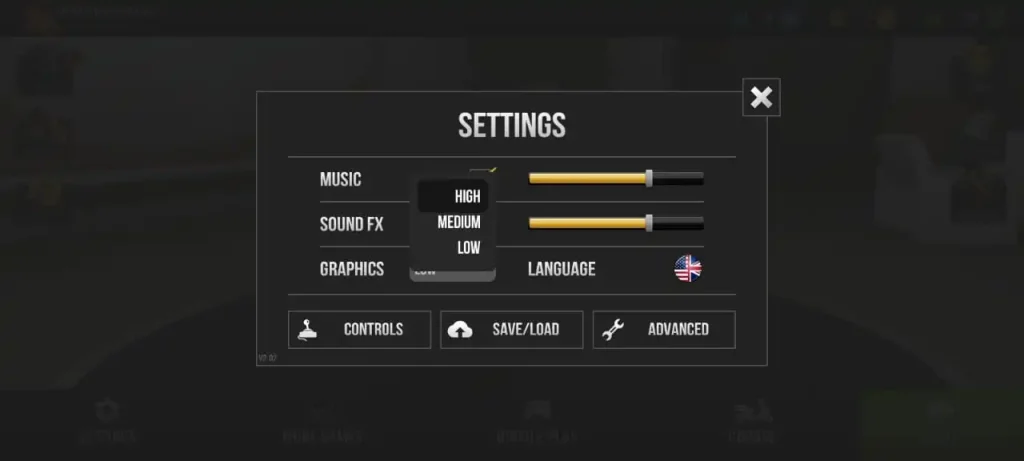
- Go to Settings > Graphics and switch from High or Ultra to Medium or Low.
- You’ll still enjoy smooth gameplay, but with much less power usage.
2. Limit Frame Rate (FPS)
High FPS looks great, but it’s a big battery drainer.
- In Settings > Performance, set FPS to 30 instead of 60.
- This reduces GPU load and keeps your phone cooler.
3. Turn Off Vibration & Extra Effects
Vibration feedback and motion effects consume extra battery.
- Disable vibration in settings.
- Turn off lens flare, reflections, and extra shadows.
4. Adjust Sound Settings
Surprisingly, sound effects and background music also use extra processing power.
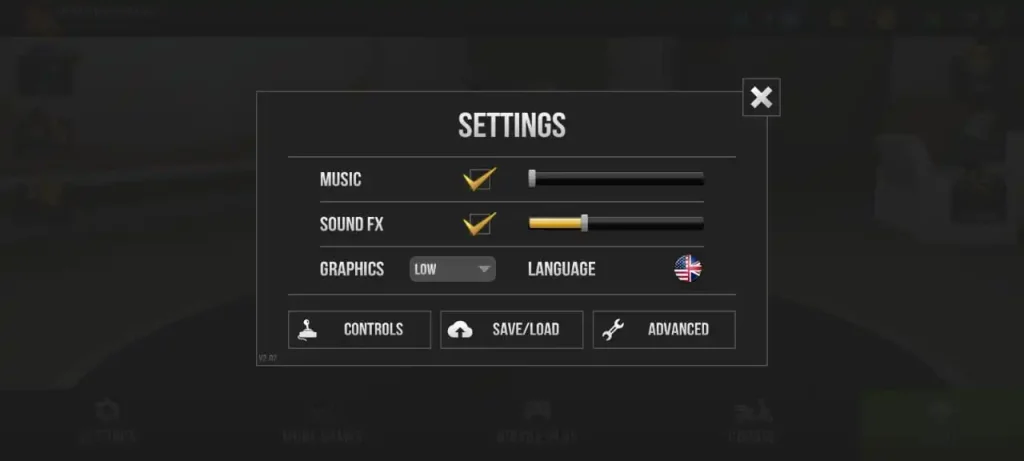
- Lower the sound volume or mute background music.
- Keep only engine sounds for immersion while saving energy.
5. Enable Power Saver Mode on Your Device
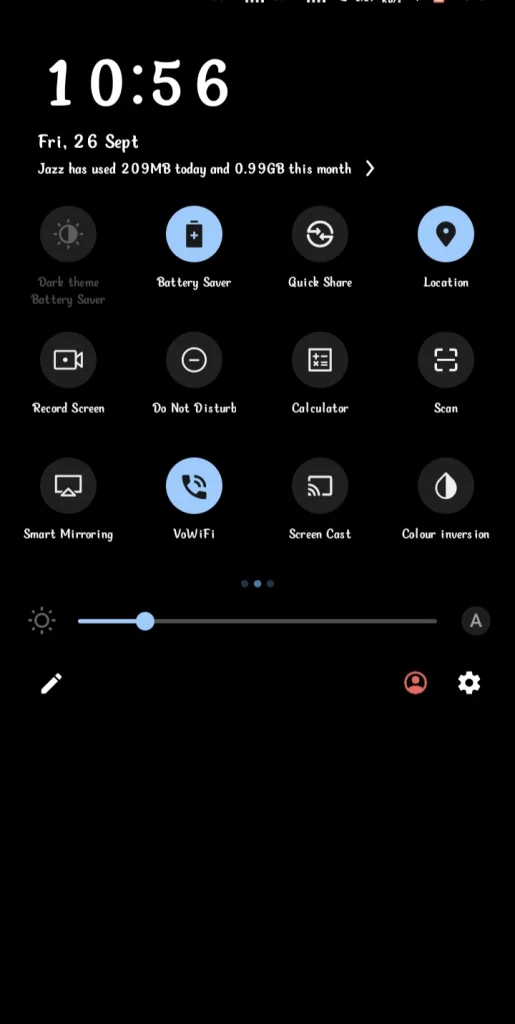
Alongside in-game tweaks, use your phone’s built-in battery saver mode.
- This limits background apps and keeps Traffic Rider running more efficiently.
6. Play on Wi-Fi Instead of Mobile Data
Mobile data drains both battery and heat.
- Use Wi-Fi whenever possible to reduce strain.
👉 If you want even smoother rides, check out our guide on Traffic Rider on Low-End Phones: Best Settings for Smooth Gameplay.
Device-Specific Battery Saving Tips
While the in-game settings of Traffic Rider work the same for both Android and iOS, you can take things further by enabling device-level power optimizations.
1. 🔋 For Android Users
- Enable Battery Saver Mode – This reduces background activity and extends playtime.
- Turn Off Background Apps – Close unused apps running in the background to free up resources.
- Use Adaptive Brightness – Prevents the screen from using more power than needed.
2. 🍏 For iOS Users
- Turn On Low Power Mode – This automatically reduces background tasks and extends battery life.
- Reduce Motion & Animations – Go to Settings > Accessibility > Motion and toggle off extra effects.
- Lower Screen Brightness – Simple but effective to save extra battery during long gaming sessions.
By combining these device-specific tweaks with in-game settings, you’ll enjoy smoother rides without worrying about your phone dying mid-race.
Additional Tips for Extending Battery While Playing
- Keep your screen brightness around 40–50% instead of maximum.
- Close unused apps before launching Traffic Rider.
- Avoid charging while playing—it generates more heat and damages battery health.
Frequently Asked Questions |FAQs|
Final Verdict
Battery drain doesn’t have to end your gaming sessions early. By fine-tuning graphics, lowering frame rates, and managing sound in Traffic Rider settings to save battery power, you can enjoy smoother rides without constantly reaching for the charger. These small adjustments not only extend playtime but also protect your device’s health in the long run. The smarter you optimize, the longer you ride.
⚡ Ready to ride longer without worrying about battery drain? Try these settings today and feel the difference. Don’t forget to explore our other Traffic Rider guides for more pro tips—and share your own battery-saving tricks in the comments!